
Public forms are one of the most vulnerable entry points in any web application.
Whether it is a contact form, lead capture form, or website audit request form, if it is public, it will eventually be abused.
Bots do not care whether you are a small startup or a large SaaS company. They scan and attack endpoints automatically.
In this guide, we break down in depth how to build a production-grade form security system in Next.js using:
- IP & Email Rate Limiting
- Cloudflare Turnstile
- Honeypot Fields
- Rule-Based Spam Detection
- Structured Security Logging
This is not theory. This is the architecture we implemented in a real-world Next.js 16 application.
Why Basic Form Validation Is Not Enough
Most developers start with:
- Required field validation
- Email format validation
- Maybe a simple CAPTCHA
But here is the reality:
- Bots can bypass frontend validation
- Scripts can call your API directly
- Disposable emails pass basic checks
- Headless browsers solve simple CAPTCHA
- Attackers can flood your endpoint repeatedly
If your backend blindly processes every request:
- Email sending costs increase
- Domain reputation is damaged
- Lead quality drops
- Server resources are wasted
- Inbox becomes unmanageable
The solution is not one tool.
The solution is layered defense.
What Is Layered Form Security?
Layered form security means combining multiple independent protection mechanisms so that if one fails, others still protect the system.
Instead of relying on only CAPTCHA or only rate limiting, we combine:
- Schema validation
- Honeypot detection
- CAPTCHA verification
- IP rate limiting
- Email rate limiting
- Spam signal analysis
- Security event logging
Each layer targets a different type of abuse.
This dramatically reduces attack surface.
Our Real-World Tech Stack
We built this system using:
- Next.js 16 (App Router)
- TypeScript
- React Hook Form + Zod
- Cloudflare Turnstile
- Upstash Redis + Upstash Ratelimit
- Resend (email delivery)
- Structured security logging
All protection logic runs server-side inside API route handlers.
Frontend validation is only for user experience - never for trust.
Layer 1: Rate Limiting (IP + Email)
What Is Rate Limiting?
Rate limiting restricts how many requests can be made within a specific time window.
Example:
- 5 submissions per 30 minutes per IP
- 2 submissions per 30 minutes per email
This prevents repeated abuse.
Why IP Rate Limiting Matters
If a bot runs from a single IP address, rate limiting:
- Stops flooding
- Protects server resources
- Prevents brute submission loops
Without IP limits, a script can hit your API hundreds of times per minute.
Why Email-Based Rate Limiting Matters
Attackers often rotate IP addresses but reuse emails.
Email rate limiting prevents:
- Repeated fake submissions
- Spam loops using same email
- Automated retries
IP limit alone is not enough. Email limit alone is not enough. Together, they are stronger.
Implementation Strategy
We use Upstash Redis with sliding window logic.
When limit exceeds:
- Return HTTP 429
- Include Retry-After header
- Log rate_limited event
This keeps API predictable and transparent.
Layer 2: Cloudflare Turnstile
What Is Turnstile?
Cloudflare Turnstile is a modern CAPTCHA alternative designed to verify human users with minimal friction.
Unlike old CAPTCHAs:
- Often invisible
- Privacy-friendly
- Server-side verified
- Harder to automate
Why CAPTCHA Alone Is Not Enough
CAPTCHA blocks automation at surface level.
But:
- It does not prevent repeated valid submissions
- It does not stop disposable emails
- It does not filter junk content
It is one layer - not the entire system.
Proper Implementation Rule
Never trust frontend token alone.
Always:
- Send token to backend.
- Verify using Cloudflare siteverify endpoint.
- Pass remote IP for stronger validation.
- Reject request if verification fails.
This prevents token replay attacks.
Layer 3: Honeypot Field
What Is a Honeypot?
A honeypot is a hidden input field that real users never interact with.
Bots often auto-fill every input in a form.
If the hidden field contains data:
- The request is classified as bot traffic.
- The request is rejected immediately.
- The event is logged.
Why Honeypots Are Powerful
They:
- Have zero UX cost
- Require minimal code
- Stop low-effort bots instantly
- Add no external dependency
Many spam scripts fail at this basic check.
Layer 4: Rule-Based Spam Detection
Even after CAPTCHA and rate limiting, low-quality submissions can still pass.
That is where rule-based filtering helps.
We check for:
- Disposable email domains
- Suspicious user agents (curl, python-requests)
- Spam keywords (crypto, casino, forex)
- Excessive external links
Why This Layer Matters
CAPTCHA verifies humans. Spam detection verifies intent quality.
Someone can be human and still submit junk.
This layer improves lead quality.
Layer 5: Structured Security Logging
Security without visibility is incomplete.
We log all blocked or suspicious requests:
- validation_failed
- rate_limited
- fake_submission
Each log contains:
- IP
- Event type
- Timestamp
- Reason codes
Stored in Redis for analysis.
Why Logging Is Critical
Without logs:
- You cannot detect attack patterns
- You cannot tune limits intelligently
- You cannot debug false positives
- You cannot measure security effectiveness
Logging transforms reactive defense into proactive strategy.
Real-World Architecture Flow
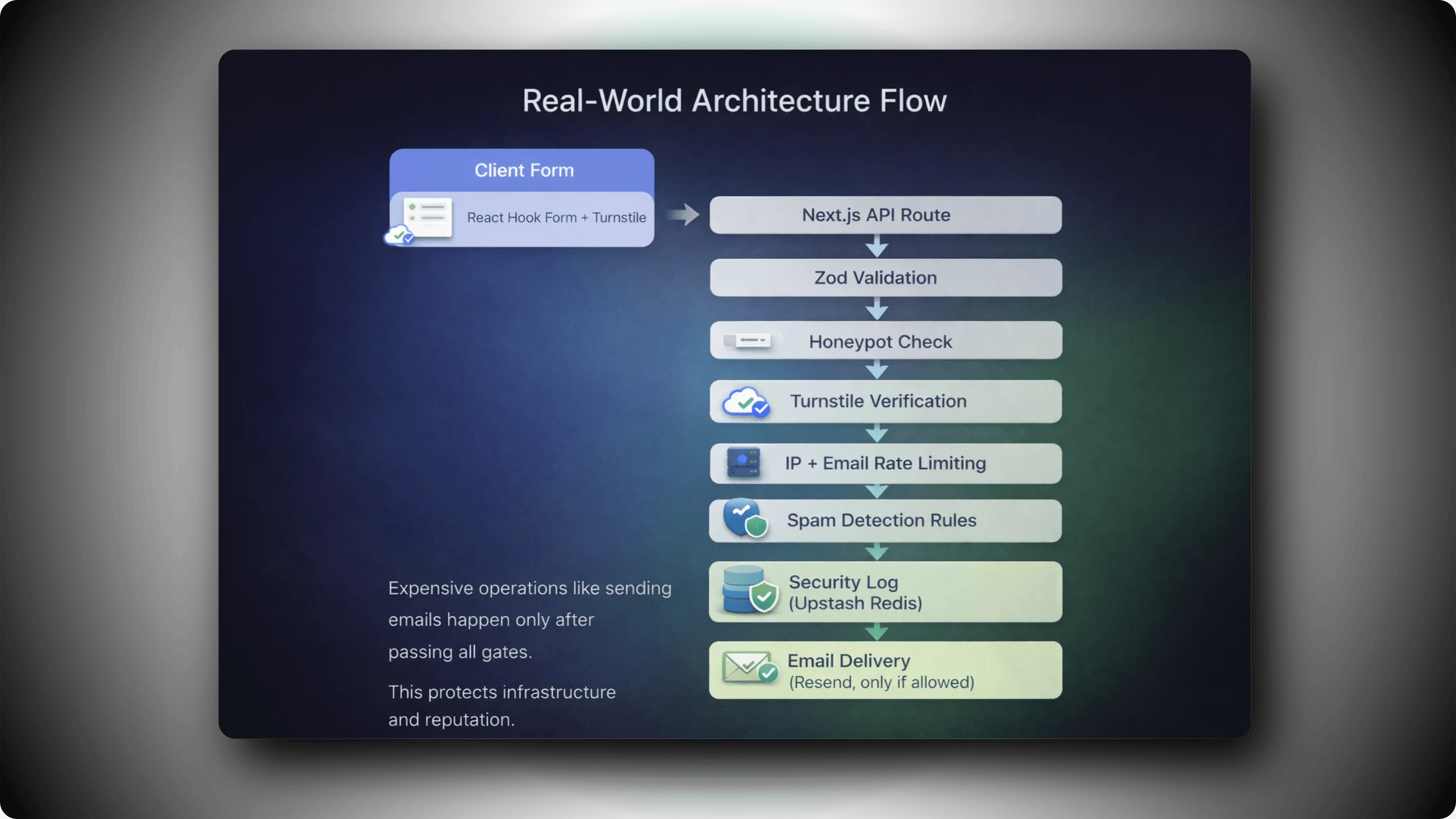
Layered Architecture
Expensive operations like sending emails happen only after passing all gates.
This protects infrastructure and reputation.
Benefits of This Layered Architecture
1. Protects Email Reputation
Spam never reaches your email provider.
2. Improves Lead Quality
Low-effort spam is filtered automatically.
3. Reduces Infrastructure Costs
Prevents unnecessary API and email usage.
4. Maintains Clean Analytics
Fake submissions do not pollute your data.
5. Scales With Your SaaS
Works for small apps and large production systems.
When Should You Implement This?
You should harden your forms if:
- You run a SaaS product
- You collect leads
- You offer free audits or demos
- You expose public APIs
- You rely on automated email workflows
If your form is public, it needs layered protection.
Common Mistakes to Avoid
- Trusting frontend validation.
- Using only CAPTCHA.
- Not logging blocked attempts.
- Not returning proper HTTP 429 responses.
- Allowing unlimited retries.
Security must be intentional - not accidental.
Final Thoughts
Form security is not about adding one tool.
It is about designing a defensive pipeline.
Rate limiting
- CAPTCHA verification
- Honeypot detection
- Spam filtering
- Structured logging
Together, these layers create a production-grade anti-spam system suitable for modern Next.js applications.
If you are building serious software, this is the level of form protection you should aim for.