
Public forms are one of the most abused entry points in any SaaS application.
In our production app, we implemented a full multi-layer form protection system for:
/api/contact/api/audit
This wasn’t theoretical. It was built to protect real business logic, reduce fake submissions, and maintain lead quality.
If you're building a Next.js SaaS app, this guide explains exactly how we secured our forms - and why a single CAPTCHA is never enough.
What Is a Secure Form Stack?
A secure form stack is a layered anti-abuse architecture designed to stop bots, spam, disposable emails, and automated scripts before they reach business logic.
Instead of relying on one protection method, we combined:
- IP-based rate limiting
- Email-based rate limiting
- Cloudflare Turnstile verification
- Honeypot field validation
- Rule-based spam detection
- Structured security logging
Each layer blocks a different type of abuse.
Why Traditional Form Protection Fails
Most basic contact forms rely only on:
- Frontend validation
- Simple email format checks
- Basic CAPTCHA
These can be bypassed using:
- Automated scripts (curl, Postman, Python requests)
- Disposable email services
- Rotating proxies
- Headless browsers
Without layered security:
- Spam reaches your email provider
- Domain reputation suffers
- Lead quality drops
- Operational noise increases
We needed something stronger.
Our Actual Tech Stack
We implemented this using:
- Next.js 16 (App Router)
- TypeScript
- React Hook Form + Zod
- Cloudflare Turnstile
- Upstash Redis (
@upstash/redis,@upstash/ratelimit) - Resend (email delivery)
- Structured security logging in Redis
Everything runs inside server-side route handlers - never trusting frontend validation alone.
How Our Security Pipeline Works
Every form submission follows this exact flow:
- Zod schema validation
- Honeypot check
- Turnstile CAPTCHA verification
- IP + Email rate limit enforcement
- Spam signal detection
- Security event logging
- Email processing (only if all checks pass)
This order is intentional.
Expensive operations like sending emails are always protected behind multiple security gates.
Layer 1: Honeypot Protection
We added a hidden input field:
website: z.string().optional().or(z.literal(""))If this field contains any value:
- The request is flagged as malicious
- Logged as
fake_submission - Immediately rejected
Most basic bots fill every input automatically - this blocks them instantly.
Layer 2: Cloudflare Turnstile (Bot Verification)
Instead of traditional CAPTCHA, we use Turnstile:
- Minimal user friction
- Invisible for legitimate users
- Server-side token verification
- Remote IP validation
Server verification example:
const captchaOk = await verifyCaptcha({ token: formData.turnstileToken, ip: clientIp,});if (!captchaOk) { return denyRequest("CAPTCHA_FAILED");}Frontend validation alone is not enough. Verification must happen server-side.
Layer 3: IP + Email Rate Limiting
We enforce two independent limits:
- 5 submissions per 30 minutes per IP
- 2 submissions per 30 minutes per email
Example:
const limitResult = await applyRateLimit({ ip: clientIp, email: formData.email, route: "contact",});if (!limitResult.allowed) { return tooManyRequests(limitResult.retryAfter);}This prevents:
- Email rotation abuse
- Same-IP brute submission
- Scripted retry loops
Layer 4: Rule-Based Spam Detection
We added detection rules for:
- Disposable email domains
- Suspicious user agents (curl, python-requests)
- Excessive links in message body
- Spam keywords (crypto, casino, forex, etc.)
If triggered:
- Logged as
fake_submission - Submission rejected
This improves lead quality dramatically.
Layer 5: Structured Security Logging
Every blocked request is logged in Redis with:
- IP
- Event type
- Timestamp
- Failure reason
We log:
validation_failedrate_limitedfake_submission
This gives us visibility into abuse patterns and helps tune rules over time.
Real-World Architecture
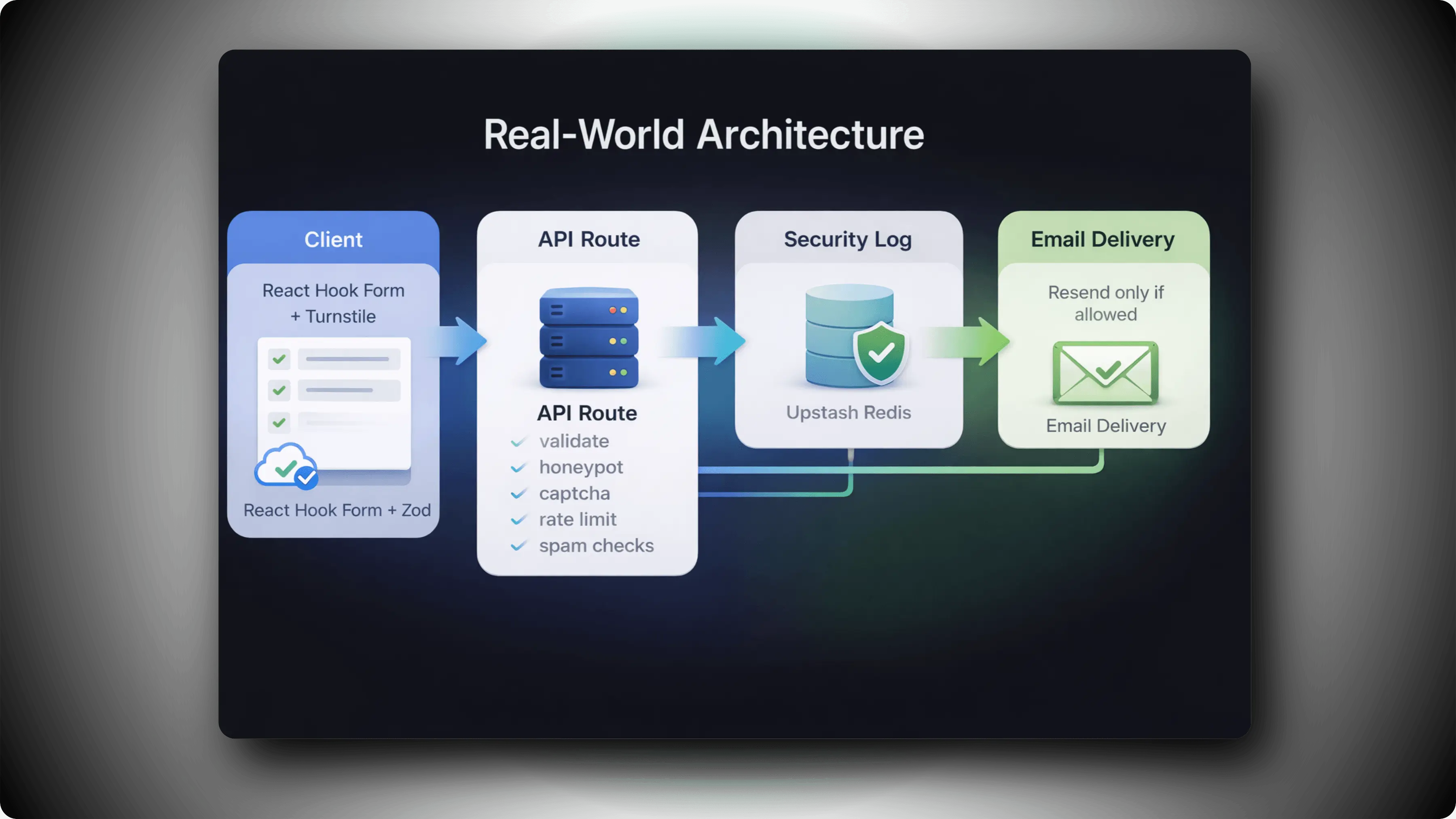
Websyro Form Protection
This architecture is:
- Simple
- Scalable
- Debuggable
- Production-ready
Benefits We Observed
After implementing this stack:
- Spam never reaches our email provider
- Lead quality improved significantly
- Email reputation remains protected
- Blocking reasons are measurable
- Security tuning became data-driven
Most importantly - real users experience no friction.
When Should You Implement This?
You should harden your forms if:
- You run a SaaS product
- You offer free audits or consultations
- You expose public APIs
- You rely on automated email workflows
- You care about lead quality
Form abuse is not a matter of “if,” but “when.”
Layered defense is the safest long-term strategy.
Final Thoughts
CAPTCHA alone is not enough.
Rate limiting alone is not enough.
The safest architecture combines:
Bot verification
- Rate limiting
- Honeypot validation
- Spam detection
- Security logging
This is how modern Next.js applications should secure public forms.
Build once. Protect forever.